

MB vs MiB: The Storage Unit Confusion That Cost You Disk Space
This article is part of our complete pillar guide: Digital & Tech Units — The Complete Guide. Head there for the full breakdown of data storage, transfer speed, color codes, and other tech units.
You bought a "1 TB" hard drive. You plugged it into Windows. Windows said it was a 931 GB drive. You felt cheated, vaguely sued someone in your head, and moved on. But the missing 69 gigabytes were not lost — they were never there to begin with. They are an artifact of a 50-year-old fight between marketing departments, engineers, and the standards committee that finally tried to fix it. Here is the full story.
The bottom line
Two numbers, and the entire confusion sits between them:
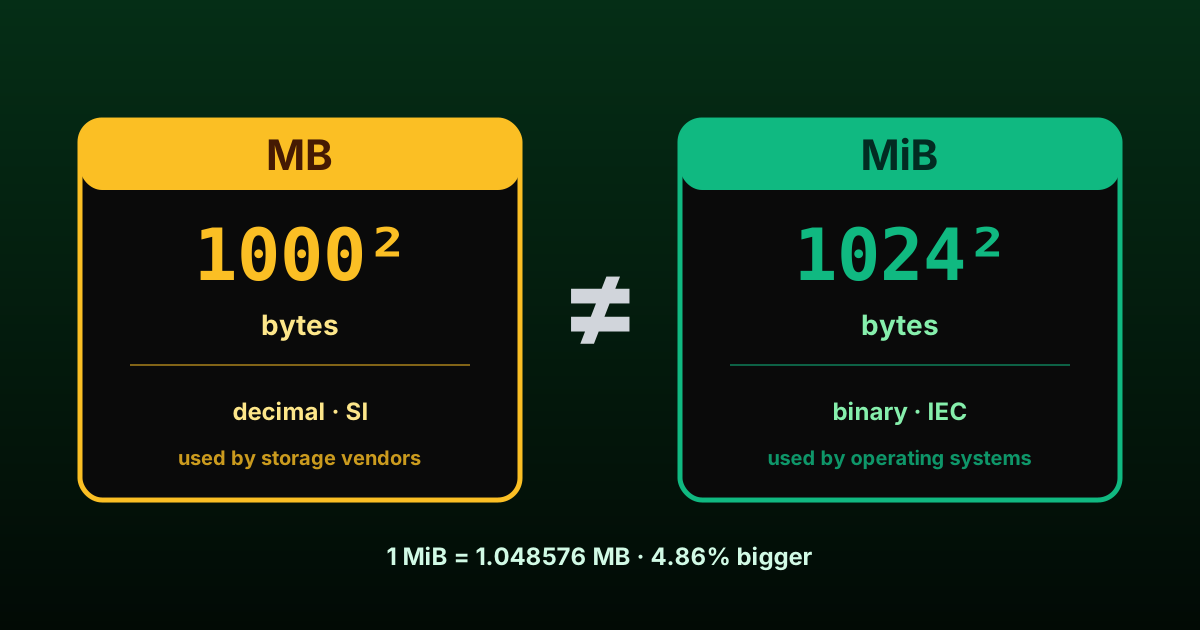
- 1 MB (megabyte) = 1,000,000 bytes (decimal, base 10)
- 1 MiB (mebibyte) = 1,048,576 bytes (binary, base 2 — exactly 2²⁰)
The difference is small at small sizes but compounds quickly:
| Decimal | = bytes | Binary | = bytes | Difference |
|---|---|---|---|---|
| 1 KB | 1,000 | 1 KiB | 1,024 | 2.4% |
| 1 MB | 1,000,000 | 1 MiB | 1,048,576 | 4.9% |
| 1 GB | 1,000,000,000 | 1 GiB | 1,073,741,824 | 7.4% |
| 1 TB | 10¹² | 1 TiB | 2⁴⁰ | 10.0% |
| 1 PB | 10¹⁵ | 1 PiB | 2⁵⁰ | 12.6% |
For an interactive lookup that handles every prefix from kilobyte to yottabyte (and bits as well as bytes), see our data storage converter.
💡 Fun fact: The "missing" disk space on a 1 TB drive isn't missing at all. The drive really has 1,000,000,000,000 bytes. Windows just chooses to count them in groups of 1,073,741,824 and labels the result "GB," which is the actual source of confusion.
Why your 1 TB drive shows ~931 GiB
The math:
- 1 TB (as the manufacturer ships it) = 1,000,000,000,000 bytes
- 1,000,000,000,000 ÷ 1,073,741,824 (1 GiB) = 931.32 GiB
Your drive has the exact number of bytes promised on the box. Windows just displays a quantity calculated in binary multiples but labels it with the decimal symbol "GB", which is where every Reddit thread on this topic starts. macOS since 2009 displays the same drive as "1 TB" by using actual decimal units. Same hardware, two different labels.
This isn't a conspiracy. It's a historical accident from the 1960s and 70s, when computer scientists casually started using "kilobyte" to mean 1,024 bytes because 2¹⁰ (1,024) is conveniently close to 10³ (1,000). The shortcut stuck. By the time computers were a consumer product, the same prefix meant two different things depending on whom you asked.
The IEC standard (1998) that introduced KiB/MiB/GiB
The fight came to a head in the 1990s as hard drives crossed the gigabyte threshold and the gap between 10⁹ and 2³⁰ became visible to ordinary users. In December 1998, the International Electrotechnical Commission (IEC) ratified standard IEC 60027-2, formally creating the binary prefixes:
| Decimal (SI) | Binary (IEC) |
|---|---|
| kilo- (k, 10³) | kibi- (Ki, 2¹⁰) |
| mega- (M, 10⁶) | mebi- (Mi, 2²⁰) |
| giga- (G, 10⁹) | gibi- (Gi, 2³⁰) |
| tera- (T, 10¹²) | tebi- (Ti, 2⁴⁰) |
| peta- (P, 10¹⁵) | pebi- (Pi, 2⁵⁰) |
| exa- (E, 10¹⁸) | exbi- (Ei, 2⁶⁰) |
| zetta- (Z, 10²¹) | zebi- (Zi, 2⁷⁰) |
| yotta- (Y, 10²⁴) | yobi- (Yi, 2⁸⁰) |
Under the IEC convention:
- 1 KB = 1,000 bytes
- 1 KiB = 1,024 bytes
- 1 MB = 1,000,000 bytes
- 1 MiB = 1,048,576 bytes
The "bi" syllable comes from "binary," and it is pronounced "kibby," "mebby," "gibby." Yes, "gibibyte" is a real word, even though it sounds like a Pokémon.
The IEC's intent was a clean break: SI prefixes (kilo-, mega-, giga-) for decimal multiples, binary prefixes (kibi-, mebi-, gibi-) for binary multiples. Once the standard existed, nobody had any excuse for ambiguity. In practice, nobody adopted it consistently for over a decade.
Why Windows still uses binary but labels it MB
Microsoft has never updated its file-size display conventions. Windows 11 in 2025 still:
- Calculates file and disk sizes in binary (powers of 2)
- Labels the result with the decimal symbols (KB, MB, GB, TB)
So Windows showing a "100 MB" file actually means a file of 104,857,600 bytes (100 MiB), but it does not say "MiB." Apple changed convention in 2009. Microsoft, citing the cost and confusion of breaking with three decades of file-size labels in user-facing software, has kept the legacy behavior.
Linux is split. The terminal commands ls and du default to binary-with-decimal-label behavior just like Windows. The flag --si or -h --si forces true decimal output. Modern GNOME file managers use decimal. KDE Plasma is configurable. There is no single Linux answer — only a per-distro convention.
Apple's switch to decimal in macOS 10.6
In August 2009, with the release of macOS 10.6 Snow Leopard, Apple switched the entire OS file-size display to proper decimal SI units. Overnight, every file and disk on every Mac suddenly looked about 5-10% bigger than it had the day before, even though nothing had changed on disk.
This was deliberate. Apple's reasoning: when a hard drive manufacturer prints "500 GB" on the box, customers should see "500 GB" on the desktop, not "465.66 GB." Bringing the OS into alignment with the marketing convention eliminated the most common complaint from non-technical users.
The downside: a file that is 104,857,600 bytes (exactly 100 MiB) now shows as "104.9 MB" on macOS, while the same file shows as "100 MB" on Windows. Same file, different number, no good way to reconcile them without explaining base 2 to your aunt.
Networking: always decimal
There is one area where the convention has been clear since day one: network speeds are always in decimal.
- 1 Mbps = 1,000,000 bits per second (not bytes — bits, with a lowercase b)
- 1 Gbps = 1,000,000,000 bits per second
- 1 MB/s = 8 Mbps (because 1 byte = 8 bits)
This is why your "1 Gbps" home fiber line can transfer at a theoretical maximum of about 125 MB/s (1,000,000,000 / 8). Network speeds use bits, storage uses bytes, and both use decimal. The mismatch between network speed and storage size labels accounts for half the "my download is slow" complaints on the internet.
💡 Fun fact: When your ISP advertises "1 Gbps," that's 1,000,000,000 bits per second, which is 125,000,000 bytes per second, or about 119 MiB/s in Windows' binary-flavored labeling. All three numbers describe the same speed. No wonder customers think they're being shortchanged.
The Western Digital lawsuit (2006)
The "missing disk space" question became a class action in March 2006. A California resident named Orin Safier sued Western Digital for "misrepresenting" the capacity of its hard drives, claiming that a "200 GB" drive actually held only 186 GiB and was thus 7% smaller than advertised.
Western Digital settled out of court in June 2006 for $30 cash or free backup software per affected drive sold between 2001 and 2006. They did not admit wrongdoing. They did agree to update their packaging to clarify that "GB" means 1,000,000,000 bytes.
Seagate faced an essentially identical lawsuit in 2007 and settled on similar terms.
Notably, neither manufacturer changed their definition — they kept selling drives in decimal GB, because decimal GB is the correct SI definition. They just added disclaimer text. The Windows display convention, which is the actual source of user confusion, was untouched.
Quick conversion table
| Term | Binary value (bytes) | Decimal equivalent |
|---|---|---|
| 1 KiB | 1,024 | 1.024 KB |
| 1 MiB | 1,048,576 | 1.049 MB |
| 1 GiB | 1,073,741,824 | 1.074 GB |
| 1 TiB | 1,099,511,627,776 | 1.100 TB |
| 1 PiB | 1,125,899,906,842,624 | 1.126 PB |
And going the other way:
| Term | Decimal value (bytes) | Binary equivalent |
|---|---|---|
| 1 KB | 1,000 | 0.977 KiB |
| 1 MB | 1,000,000 | 0.954 MiB |
| 1 GB | 1,000,000,000 | 0.931 GiB |
| 1 TB | 1,000,000,000,000 | 0.909 TiB |
| 1 PB | 10¹⁵ | 0.888 PiB |
Sibling reading
If you are interested in how measurement conventions get baked into hardware and never get cleaned up, see our piece on Imperial vs Metric. The MB-vs-MiB story is the digital era's version of the same cultural-inertia problem.
Developers working with data storage and file sizes will find more technical utilities at DevToolzy — free tools for JSON, base64, URL encoding, and more.
Key takeaways
- 1 MB = 1,000,000 bytes. 1 MiB = 1,048,576 bytes. They differ by about 4.9%.
- Hard drive manufacturers use SI decimal (correct per the SI standard).
- Windows uses binary multiples internally but labels them with decimal symbols. This is the source of "missing" disk space.
- macOS has used decimal since Snow Leopard (2009). Linux varies.
- Network speeds (Mbps, Gbps) are always decimal and always in bits, not bytes.
- The IEC introduced KiB, MiB, GiB in 1998 to disambiguate. Adoption is still inconsistent in 2025.
FAQ
What's the difference between MB and MiB?
MB is decimal (1,000,000 bytes). MiB is binary (1,048,576 bytes). The 4.9% difference is small at the megabyte scale but grows to ~10% at the terabyte scale, which is why "1 TB" drives show as ~931 GiB in Windows.
Why does Windows show my drive as smaller than advertised?
Because Windows computes file sizes in binary multiples (1024-based) but labels the result with decimal symbols (MB, GB, TB). The drive really does contain the advertised number of bytes — Windows just counts and labels them in an inconsistent way.
Are megabits and megabytes the same?
No. 1 megabyte = 8 megabits. Storage is measured in bytes (capital B): MB, GB, TB. Network speed is measured in bits (lowercase b): Mbps, Gbps. A 1 Gbps connection transfers data at about 125 MB/s, not 1000 MB/s.
Should I use MB or MiB in my own writing?
If you're writing for a general audience, MB is what people understand. If you're writing technical documentation where precision matters (kernel docs, storage system specs, cloud billing) use MiB to be unambiguous. Either way, define what you mean the first time you use it.
More tools by Cosyslabs: Developer utilities · PDF conversion tools · Productivity tools · All Cosyslabs tools